

Editorial note: This article presents an informal, unsponsored overview of three budgeting apps. Guardian Litigation Group has no financial relationship with any of the apps reviewed and receives no compensation for their inclusion.
If you are carrying credit card debt, medical bills, or other unsecured debt, you already know the weight of it. Every month the balance seems to reset the clock on your progress. One of the most effective first steps toward making debt manageable is knowing, with real clarity, where your money goes. That is where budgeting apps come in.
Three of the most widely used apps right now are YNAB (You Need a Budget), Rocket Money, and EveryDollar. Each takes a different approach to helping you track spending and work toward financial goals. This article breaks down how each one works, what it costs, and who is most likely to stick with it long enough to make a real difference in their finances.
Budgeting App for Debt
Not all budgeting tools are built the same way, and the differences matter when you are trying to pay down credit card debt or other unsecured obligations. A good debt-focused budgeting app should help you understand exactly where every dollar goes each month, show you how much room exists to redirect money toward debt payments, hold you accountable when you overspend in a category, and be easy enough to use that you actually open it.
That last point is not a small thing. The best budgeting system in the world does not work if it sits unused on your phone. When reviewing these three apps, the question of real-world usage sits alongside features and price.
YNAB: Most Structured for Serious Debt Reduction
What it is and how it works
YNAB is built around a philosophy called zero-based budgeting. The idea is simple: every dollar you earn gets assigned to a specific category before you spend it. Rent, groceries, utilities, minimum debt payments, and anything else all get a line item. If you have money left over after covering essentials, you deliberately decide where it goes rather than watching it disappear. YNAB calls this “giving every dollar a job.”
The app walks you through setting up categories, connecting your accounts, and adjusting as life changes. It also includes a loan planner that lets you simulate how different payment amounts affect your payoff timeline.
What it costs
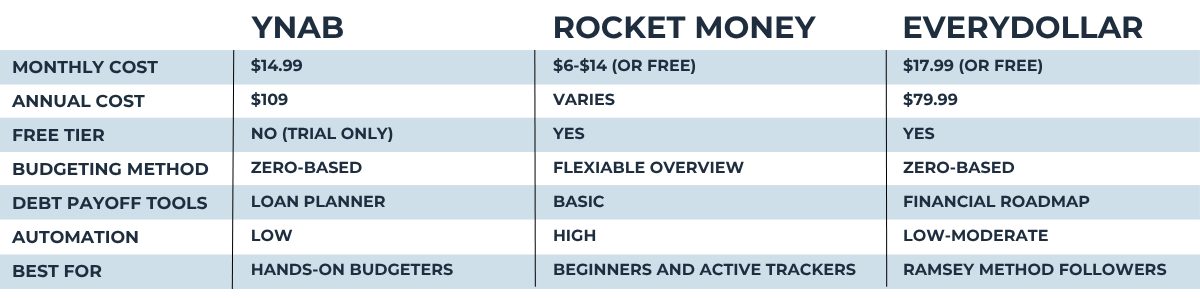
YNAB has no free tier after the trial period. It costs $14.99 per month or $109 per year. A 34-day free trial is available, and college students can use it free for a year. That is the highest price point of the three apps reviewed here.
Who is likely to use it consistently
YNAB has a committed user community, and many people who stick with it report meaningful changes in their financial habits. However, reviewers consistently note a real learning curve. It requires time, attention, and a willingness to revisit the budget regularly. People who enjoy structure, detailed tracking, and a hands-on approach to money tend to thrive with YNAB. Those who want something low-maintenance may find themselves abandoning it within a few weeks.
Strengths for debt payoff
The zero-based method forces you to make intentional choices about every dollar, which can surface extra money you did not know you had. YNAB’s loan planner allows you to model debt payoff scenarios, which can be motivating when you see how an extra payment each month shortens your timeline. The app also supports up to five users under one membership, making it useful for households working on shared finances.
Limitations
There is no subscription cancellation service, no bill negotiation, and minimal automation. YNAB relies on the user doing most of the work manually. For someone already overwhelmed by their financial situation, that level of engagement can be a barrier.
Rocket Money: The Most Accessible Starting Point
What it is and how it works
Rocket Money (formerly known as Truebill) takes a broader, more automated approach. After linking your accounts, the app pulls in your transactions, identifies recurring subscriptions, tracks your spending by category, and gives you a dashboard view of your financial life. It also offers a bill negotiation service where its team contacts providers like cable and internet companies to try to lower your rates.
For people who are just beginning to get a handle on their spending, Rocket Money can surface what they are actually paying for month to month, including subscriptions and recurring charges they may have forgotten about entirely.
What it costs
Rocket Money has a free version that includes basic spending tracking and subscription monitoring. The Premium version uses a “pay what you think is fair” model, generally ranging from $6 to $14 per month depending on the platform and timing. A seven-day free trial is available for Premium. The bill negotiation service is separate and charges a fee of 35 to 60 percent of your first year’s savings if negotiations succeed.
Who is likely to use it consistently
Rocket Money is the most beginner-friendly of the three. The interface is clean, account connection is straightforward, and the automated features do a lot of the work for you. People who want a broad overview of their finances without building a detailed budget from scratch tend to find it easier to stay engaged.
Strengths for debt payoff
Rocket Money’s subscription tracking can immediately surface money you are wasting on unused services, and that freed-up cash can be redirected toward debt. The spending overview helps you see patterns over time. For someone in the early stages of addressing their credit card debt or other unsecured obligations, just understanding the full picture of where money goes each month is a meaningful first step.
Limitations
Rocket Money is not as specifically focused on debt payoff as YNAB. It does not include a structured debt payoff planner or a zero-based budgeting method. Its budgeting tools are more passive and overview-oriented than hands-on. For someone who wants to model exactly how long it will take to pay off a balance at a given payment level, Rocket Money offers less detail.
EveryDollar: The Simplest Zero-Based Approach
What it is and how it works
EveryDollar is a zero-based budgeting app built by Ramsey Solutions, the company behind personal finance educator Dave Ramsey. Like YNAB, it works by assigning every dollar of income to a spending or savings category. Unlike YNAB, it is designed to be simpler and faster to set up, with a more guided experience and less of a learning curve.
The app is built around Ramsey’s debt payoff philosophy, which prioritizes paying off balances one at a time starting with the smallest. EveryDollar’s premium version includes a financial roadmap feature that maps out big goals and shows a rough timeline for reaching them.
What it costs
EveryDollar has a free version that includes manual budgeting without automatic bank account syncing. The Premium version costs $17.99 per month or $79.99 per year. That annual price is the most affordable of the three at a yearly rate, though the monthly rate is the highest.
Who is likely to use it consistently
EveryDollar tends to resonate most with people who are already aligned with Ramsey’s broader financial approach, which emphasizes eliminating debt, avoiding credit cards, and following a defined step-by-step path. The free version requires manual transaction entry, which some users find builds accountability and others find tedious. Users who prefer a structured roadmap with clear milestones may find it easier to stay motivated.
Strengths for debt payoff
The zero-based structure pushes leftover money toward goals rather than letting it sit idle. The premium financial roadmap feature provides a sense of progress toward becoming debt-free, which can help with motivation over time. The app also includes paycheck planning, which helps people on irregular income avoid the trap of overspending in the days right after they get paid.
Limitations
The free version lacks automatic bank syncing, which means more manual effort. The app does not include subscription cancellation or bill negotiation. Some users also note that EveryDollar’s philosophy discourages credit card use, which can make tracking existing credit card spending a bit awkward in the interface, though workarounds exist.
A Real-World Scenario: Putting the Apps to Work
Consider someone carrying several thousand dollars in credit card debt across two cards. They know they are spending more than they should each month but are not sure where the money is actually going. They want to find a way to make their debt more manageable.
If they are comfortable with some manual setup and want detailed control, YNAB could help them allocate every paycheck intentionally and model how long each card will take to pay off. If they want to start immediately and see what subscriptions they might be able to cut, Rocket Money can give them that overview quickly and with minimal setup. If they are motivated by a clear roadmap and want the accountability of zero-based budgeting with a simpler interface, EveryDollar may be the better fit.
The Verdict: 3 Powerful Apps to Manage Your Finances
Each of these three apps takes a meaningfully different approach to budgeting, and that is actually good news. It means there is likely one that fits the way you think about money. YNAB rewards people who want deep control and are willing to invest time in the process. Rocket Money works well for people who want a fast, clear picture of where their money is going without a steep learning curve. EveryDollar sits in the middle, offering zero-based structure with a simpler setup and a built-in roadmap toward financial goals.
The honest takeaway is that you would not go wrong with any of them. The differences come down to your habits, your patience for setup, and how hands-on you want to be. What matters most is picking one and actually using it. Consistent engagement with even the most basic budgeting tool will do more for your finances than the perfect app sitting unused on your phone.
Questions to Consider
- What is zero-based budgeting and is it effective for paying off debt? Zero-based budgeting is a method where you assign every dollar of your income to a specific category before the month begins, so that your income minus all assigned expenses equals zero. The idea is not that you spend everything, but that every dollar has a deliberate destination, whether that is rent, groceries, savings, or debt payments.
- Can a budgeting app hurt my credit score? Budgeting apps themselves do not directly affect your credit score. They typically use read-only connections to your bank accounts and credit cards, meaning they can view your transaction data but cannot initiate payments or credit inquiries on your behalf. However, the financial decisions you make as a result of using a budgeting app, such as paying down balances, avoiding late payments, or reducing your credit utilization, can have a positive effect on your credit over time. If an app offers credit monitoring as a feature, checking your own credit score through such a tool is considered a “soft inquiry” and does not affect your score the way a loan application would.
- How do debt payoff methods like the snowball and avalanche approaches work? The debt snowball method involves paying minimum amounts on all debts except the one with the smallest balance, which you attack aggressively until it is gone, then rolling that payment to the next smallest. The avalanche method works the same way but targets the debt with the highest interest rate first, which generally costs less in total interest over time. Both are valid strategies, and the better one for any individual often depends on their personality. People who need early wins to stay motivated may prefer the snowball, while those who want to minimize total interest paid may prefer the avalanche. Several budgeting apps allow you to model both approaches so you can see the projected difference in timeline and total cost.
- Are free budgeting apps safe to use with my bank account information? Most reputable budgeting apps connect to your bank accounts through third-party data aggregation services that use read-only access, meaning the app can view your transaction history but cannot move money without your explicit action. Established apps typically use bank-level encryption to protect your data. That said, it is reasonable to research any app before linking financial accounts, including reading its privacy policy to understand how your data may be used or shared.
- What is the difference between a budgeting app and a debt payoff calculator? A budgeting app is a broader tool designed to track your income, spending, and financial goals over time, often with account syncing and category tracking built in. A debt payoff calculator is typically a simpler, single-purpose tool where you enter your balance, interest rate, and payment amounts to see projected timelines and total interest costs. Some budgeting apps include a version of a debt calculator within their features, as YNAB does with its loan planner. Using both together can be helpful since a budgeting app shows you the real-time picture of your spending, while a payoff calculator helps you model the impact of putting extra money toward debt.
- Do budgeting apps work for people with irregular income? Yes, though the approach may need some adjustment. Most budgeting apps are built around a monthly budget cycle, which can feel awkward when income varies from week to week or month to month. Some apps, including EveryDollar, offer paycheck-based planning that lets you build your budget around each income deposit rather than projecting a fixed monthly amount.
- How long does it typically take to see results from using a budgeting app? The timeline varies considerably depending on how consistently the app is used, how much financial flexibility a person has, and the size of the debt being addressed. Some users report noticing patterns in their spending within the first month simply from having all their transactions visible in one place, which on its own can prompt meaningful changes. Results are possible and variable, and consistency over time tends to matter more than the specific app chosen.
When an App Is Not Enough
Budgeting tools work well when debt is still manageable and the main challenge is organization and awareness. But there is a point where the problem outgrows the tool.
If you are already unable to make minimum payments, receiving calls from collectors, or concerned that a creditor may be moving toward legal action, a budgeting app is not what you need. At that stage, what matters is understanding your legal rights and knowing what protections are available to you as a consumer. Guardian Litigation Group focuses on consumer protection law and works with people whose debt has moved beyond a budgeting problem into a legal one. If that describes your situation, the conversation is informational, there is no pressure to move forward, and knowing where you stand costs you nothing.
The app pricing, features, and availability described in this article were accurate to the best of our knowledge at the time of writing and are subject to change without notice. This article represents an informal survey of three popular budgeting apps for general informational and entertainment purposes only. Readers should verify current information directly with each provider.
The information provided in this blog article is for informational and entertainment purposes only and should not be construed as legal advice. It is not intended to create, and does not constitute, an attorney-client relationship. Every legal situation is unique, and readers should consult a licensed attorney for advice specific to their circumstances.